
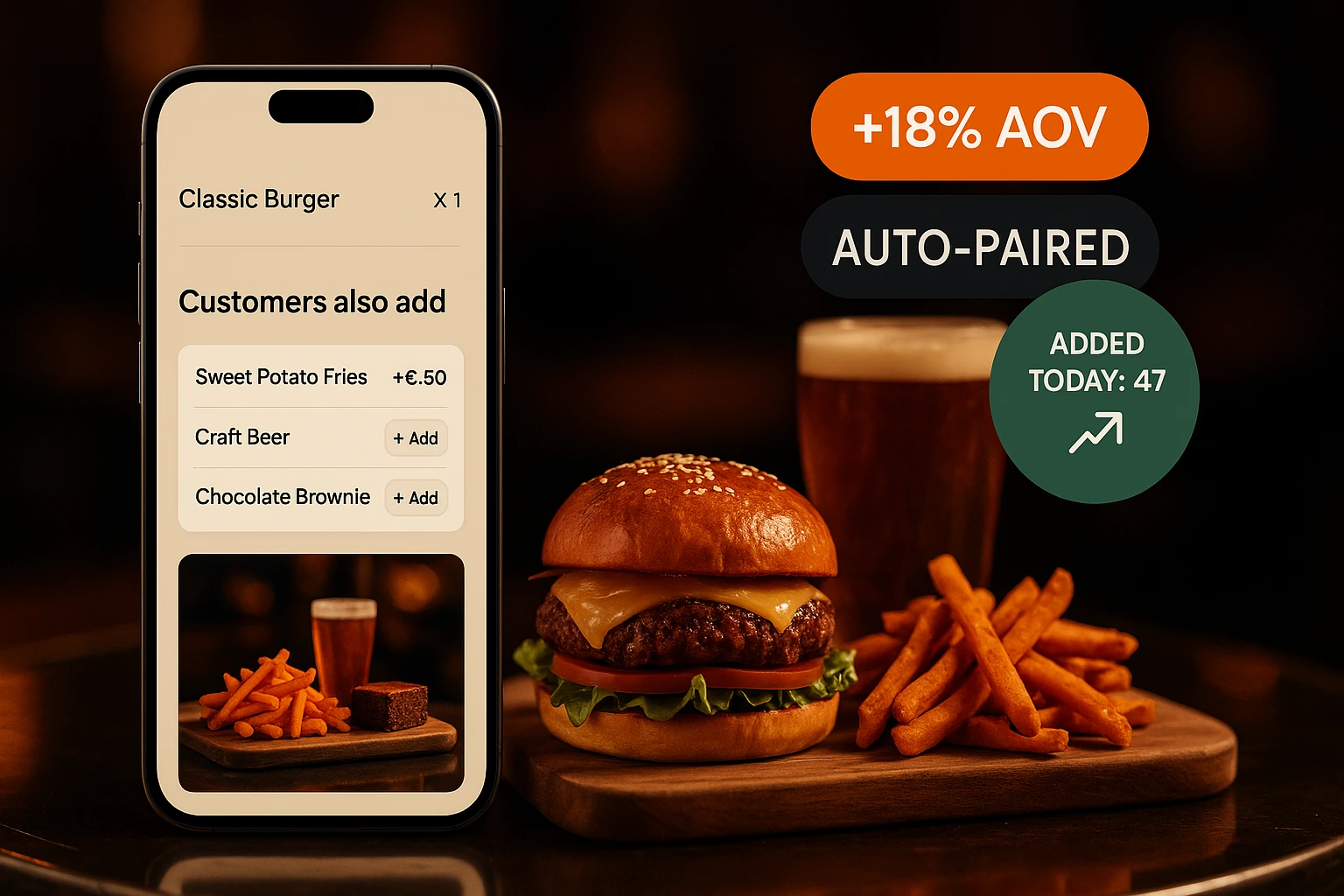
Increase Average Order Value on Autopilot
Three modes from co-purchase to AI-ranked to per-customer personalization. Pick the level that fits your venue. No staff effort. No guessing.
What Are Smart Suggestions?
Every time a customer adds an item to their cart, the system looks at two things: what other customers ordered alongside it, and what the meal is still missing. It then offers one pick per missing course — a starter, a main, a dessert, a drink — never more than three, and never twice from the same course. The data comes from your own order history — not assumptions.
Three layers, opt-in per venue: co-purchase rules (free, always on), AI-ranked re-ordering with localized reason copy that adapts to the cart context, and per-customer personalization that uses each regular's order history to tailor suggestions. Connect your own Claude key for unlimited AI usage. Suggestions appear as a post-add popup, on the cart page, and at the checkout review step.
What This Does for Your Business
Higher Average Order Value
Customers see extras that match what they already chose. A well-timed suggestion turns a single main into a full meal. The increase adds up across every order.
Zero Staff Effort
No training staff to upsell. No scripts. The system handles it automatically on every order, every shift, every day.
Based on Real Orders
Suggestions come from what your actual customers buy together — not from generic rules or manual configuration. The patterns are specific to your venue.
Keeps Up With Your Menu
The engine rebuilds daily. When you add new items or seasonal dishes, the system picks up new buying patterns automatically.
How It Works
Layer 1 — Co-Purchase Rules
Always-on baseline. The engine tracks which products appear together in completed orders, then builds suggestions around what the cart is missing: no drink in the cart means a drink is offered, no dessert means a dessert. A course the customer already has is never pushed — someone with a beer in the cart won't be offered more beer. Free, fast, runs on every venue.
Layer 2 — AI-Ranked Suggestions
Claude Haiku 5.5 re-orders the top rule candidates based on the full cart, time of day, and order type. Returns localized one-line reasons for each pick — in your customer's language. Warm-cache latency is sub-200 ms; automatic fallback to Layer 1 on any timeout or error.
Layer 3 — Per-Customer Personalization
For repeat customers (≥ 3 completed orders), the system computes a taste signature from their order history and finds products semantically close to their preferences. The Layer 2 LLM then re-ranks this personalized pool. Anonymous carts and first-time customers stay on Layer 2.
Where Suggestions Appear
Suggestions live in the cart and again at checkout, directly under the order summary — where the customer is still deciding. An optional popup right after add-to-cart is available too, off by default so browsing is never interrupted. Every surface calls the same engine, so analytics and A/B results stay consistent, and each has its own on/off switch in admin.
How Suggestions Work
Three-Layer Engine
Pick the level that fits your venue. Co-purchase rules (free) are always on. AI-ranked layer adds cart-context awareness and localized reasoning. Personalized layer tailors picks to each repeat customer's history.
- Built from your own order data, not generic rules
- Layer 2 generates EN/BG/EL reason copy in one round-trip
- Layer 3 uses vector embeddings of the customer's last 20 orders
- Each layer falls back deterministically to the layer below it
Bring Your Own Claude Key
Connect your own Anthropic API key in admin settings to bypass the platform's monthly AI quota. Unlimited suggestions, you pay Anthropic directly at their wholesale rate. Drop the key in once — every cart from that point on uses it.
- Unlimited AI requests when BYOK is connected
- Encrypted at rest in VenueIntegration storage
- Separate from Layer 1 — rules path is always free
- Per-venue spend cap as a safety net
Cost & Quota Controls
Built-in safeguards so AI costs never surprise you. Shared monthly quota with the AI Assistant + Restaurant Grader; per-venue cap; hourly burst guard against runaway carts; one-click kill-switch to flip back to free Layer 1 instantly during incidents.
- Live quota + spend dashboard at /admin/ai-usage
- Email alerts at 90 % and 100 % of monthly cap
- Per-feature cost breakdown (chat / upsells / grader / menu-import)
- Operator kill-switch on the Features page
Honest A/B Measurement
50 / 50 cookie-based split between Layer 1 (control) and the higher layer (test), sticky per customer for 30 days. The dashboard reports session-level conversion, acceptance rate, and AOV per arm with a 95 % significance gate — no winner declared until ≥ 1 000 sessions per arm.
- Sticky cookie split — same customer sees the same arm
- Shown / accepted / converted funnel tracked per row
- Significance test prevents premature claims
- Source column distinguishes rule / llm / personalized contributions
Where Suggestions Make a Difference
Burger + Sides + Drink
A customer orders a burger. The cart offers a salad, a dessert and a drink — the courses the order is missing, picked from what sells best alongside burgers at your venue. Once they add the drink, drinks stop being suggested. A single item becomes a full meal.
Pizza + Dessert
People who order pizza at your place often add a tiramisu. The cart page shows it before checkout. A suggestion the customer did not think of but is happy to add.
Coffee Shop Morning Rush
Espresso orders almost always come with a pastry. The cart shows your top-selling croissant next to the coffee, and tapping it opens the full product with its sizes and extras.
Lunch Set Completion
A customer adds a soup. Your data shows most soup orders also include bread and a salad. The suggestion fills out the meal without staff involvement.
Seasonal Dish Discovery
You add a new summer cocktail. Within a week, the engine picks up that grilled dishes pair well with it. The cocktail starts appearing as a suggestion on grill orders.
Delivery Orders
Delivery customers cannot be upsold by a waiter. Suggestions fill that gap — and they respect the order type, so a table-only item is never offered to someone ordering delivery.
Why Automated Suggestions Outperform Manual Upselling
Manual upselling depends on staff memory, training, and motivation. On a busy Friday night, suggesting extras drops to the bottom of the priority list. An automated system runs on every order regardless of how busy the kitchen is. It never forgets, never feels awkward, and never skips a table.
Data From Your Own Customers
Generic recommendation engines use broad industry data. Your customers are not generic. A steakhouse and a sushi bar have completely different pairing patterns. The Ordering.Tools suggestion engine uses only your venue's order history. The recommendations reflect what your specific customers actually buy together.
The Right Moment Matters
A suggestion shown at the wrong time is noise — and so is offering a drink to someone who already has one in the cart. The engine skips courses the order already covers and fills the gaps instead. Shown at the right time, a suggestion is helpful. The post-add popup catches the customer while they are still browsing and in buying mode. The cart page section catches them during the final review. Both moments are natural decision points where an extra item feels like a good idea, not a pushy pitch.
Measurable Impact
Every suggestion click is tracked. You can see which products generate the most add-ons, which suggestions convert, and how average order value changes over time. The analytics dashboard ties directly into the suggestion engine so you can measure the return without guesswork.
Let Your Menu Do the Upselling
Smart suggestions run on every order. No setup, no training, no scripts.
Related features
Other tools restaurants use alongside this one.
Test two descriptions, two photos, or two prices side by side. See which one gets more orders. Pick the winner. Done.
Learn moreStop staring at a blank text field. Generate product descriptions in one click for every language your menu supports.
Learn moreType a business question in plain English, Bulgarian, Greek, or Turkish. Get a charted, numerically-correct answer in seconds — backed by your live bills and orders, not a guess.
Learn moreUpload a photo, PDF, or Word document of your existing menu. Claude reads every category, item, price, and allergen — you review the result and commit a complete menu in one click.
Learn more